
Blog / Brackeys Game Jam 2023.1 Lessons Learned
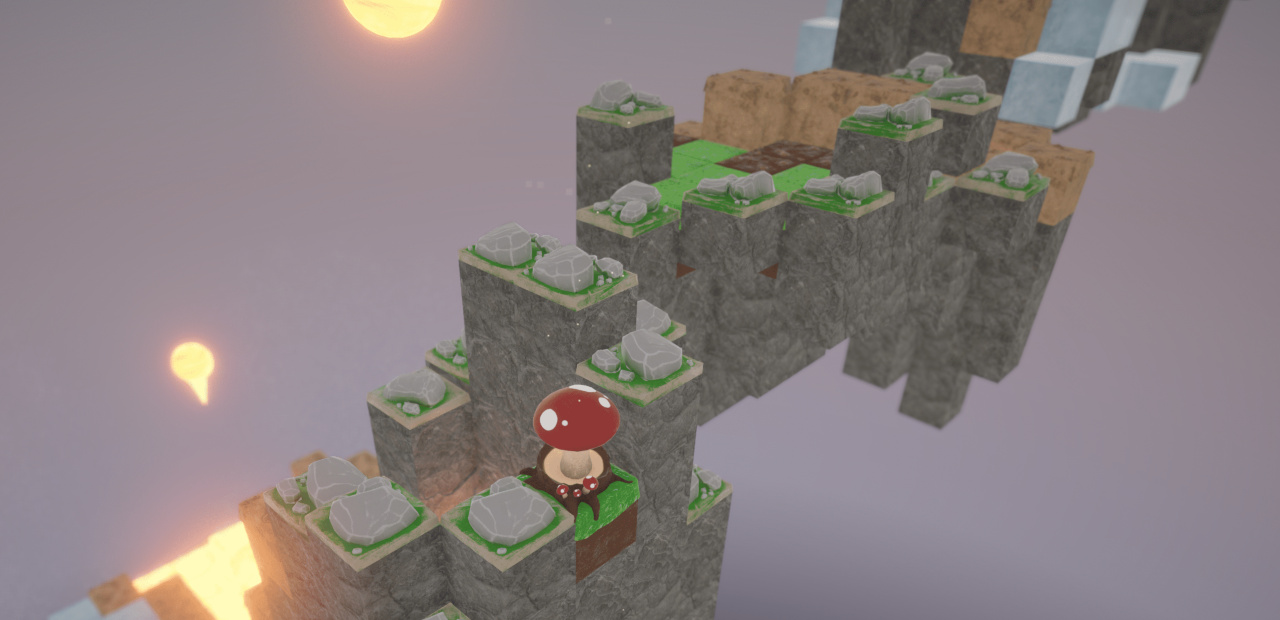
I participated in Brackeys Game Jam 2023.1 with Ding, Hobba, and The Doc, who I participated in the last Brackeys jam with, as well as Jess++ and L4zyL30. The game jam lasted one week, starting on 12 February. The scheduling was definitely sub-optimal, as it overlapped with the Super Bowl, Valentine's Day, and Presidents' Day weekend. Also, everyone on the team has a full-time job, and some members ended up having to work extra during the jam. Despite this, we successfully entered Spore Story, a slow-paced 3D platformer about the life cycle of a mushroom.
Unity was the game engine used once again, and the chance to learn more about it and do some actual scripting has not improved my opinion of it since the last jam. I was still using Debian Linux with an Intel i7-3770 CPU, 16 GB RAM, and a GTX 1080. The intent of this post is to describe what went well and what went wrong during the process, in hopes that it will help other beginner game developers avoid the same issues.
External Links:
- In-browser (WebGL), Windows (x86-64), and Linux (x86-64) builds.
- Devlog video by Ding summarizing the day-by-day progress.
Getting Started is Still the Hardest Part
The theme for this jam was, "An end is a new beginning." This naturally leads to the concepts of life cycles or food chains, but it's kind of cheap because most games have some form of multiple lives or respawning. After considerable discussion, the team settled on making a game where a spore is launched from a mushroom, and then if it lands on an appropriate tile, grows into a mushroom again, restarting the cycle.
I suggested making the terrain from cubes. One teammate was skeptical because he did not want comparisons to Minecraft, so I pointed out Monument Valley (2014) as an example of a "blocky" game that doesn't look like Minecraft. Not all of its setpieces are perfectly grid-aligned, and the isometric perspective gives it a diorama-like feel. This led to much back-and-forth about possible art styles. The Doc and I pushed for a psychedelic art style (the game is mushroom themed after all), but Ding and Hobba insisted on a cute, semi-realistic style inspired by the Link's Awakening remake (2019) and LEGO Builder's Journey (2019). L4zyL30, being the 3D modeler, had the final say, and he went with the realistic style. The models he created looked great, and Hobba's shader and lighting effects really made them pop.
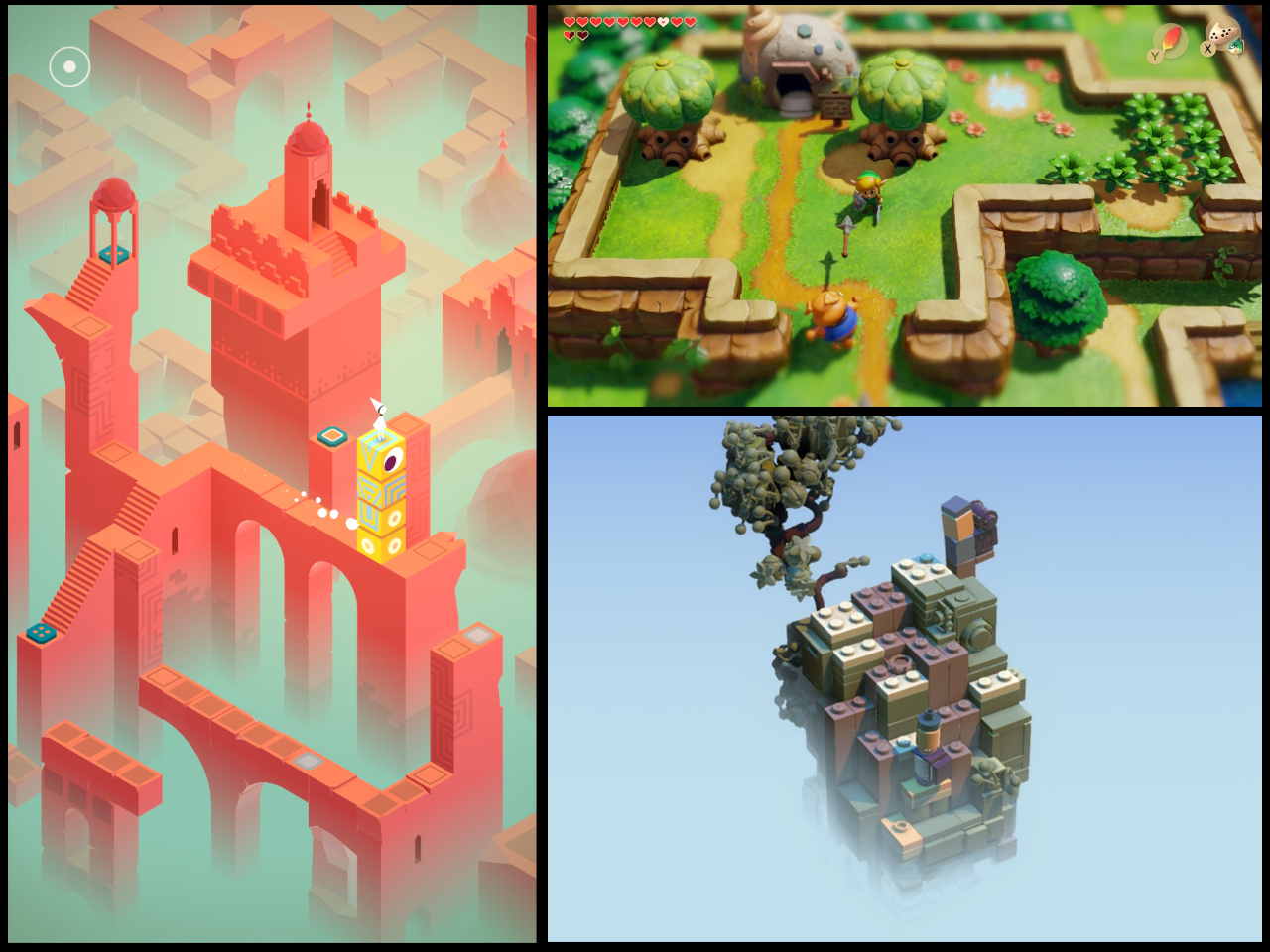
Main sources of inspiration for the art style: Monument Valley (left), 2019 Link's Awakening remake for Nintendo Switch (top), LEGO Builder's Journey (lower).
Art direction is a bigger part of a game than just decoration. Its purpose is to communicate information to the player. 3-dimensional computer graphics (and technical drawings created with pencil and paper, for that matter) can have two types of camera: perspective, where objects that are further away from the camera appear smaller, or orthographic, where objects are drawn to scale relative to each other but distance from the camera does not affect their apparent size. In the above image, one can see that Link's Awakening uses a perspective camera, while Monument Valley and LEGO Builder's Journey use orthographic cameras. It was hard to decide between a perspective camera and an orthographic camera for Spore Story because an orthographic camera looked better artistically with the diorama-like scenery, but a perspective camera made controlling the player movement feel more natural. In the end, the perspective camera was chosen.
Implementing the Game Logic
Similarly to the previous game jam, I focused on making the building blocks for the game environment. However, since I wasn't doing art this time around, my role was implementing the actual logic. The team was able to work quickly by parallelizing tasks. I got started right away on the blocks' logic and behavior by using placeholder cubes to represent them, which I then replaced with the proper 3D models as L4zyL30 created them. On the first day, The Doc created a level editor object that allows the user to create stacks of different types of blocks and adjust their vertical positioning. It was a lot nicer than using the Unity Editor by itself to place all the blocks. Additionally, an advantage of building the game out of blocks is that it allowed for physically very large levels with a relatively large number of polygons that still were reasonable in terms of performance and disk space. The runtime performance came from the fact that if there are multiple instances of the same 3D model being rendered on-screen, it only needs to be uploaded to the GPU once. The advantage for disk space is similar; you only need to store one of each model.
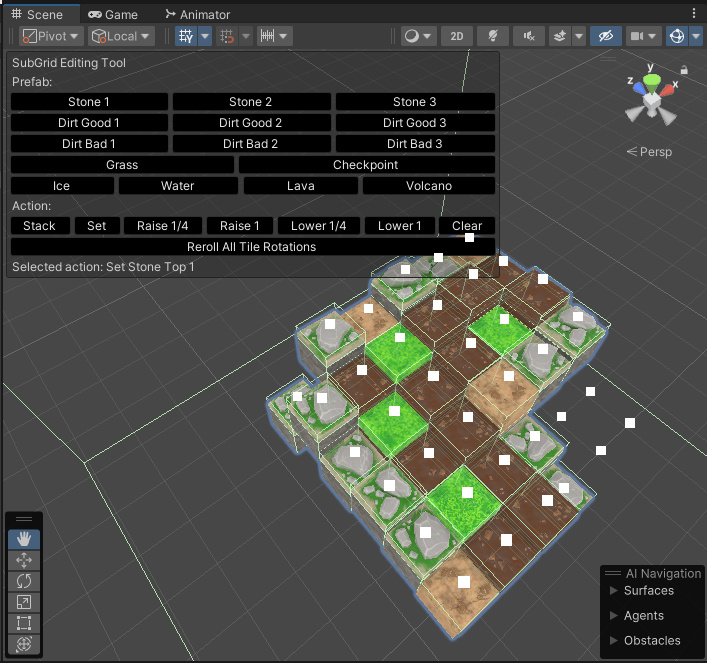
The Doc's level editor. You highlight a stack of blocks by clicking the white square above it, and then select an action in the GUI. It's simple but it works.
To make the visuals less repetitive, there are three models for each block type, and when a block is placed, it gets rotated about the y-axis by a random multiple of 90 degrees.
My biggest programming challenge was deciding where to implement the logic. In Unity, each GameObject can have zero or more "scripts" (C# classes) attached to it. When a mushroom spore lands on a grass block and sprouts a new mushroom, which object is responsible for making this happen? The block? The spore? Or both? The other problem was how to keep track of the mushrooms. I made a state machine that was responsible for tracking the mushroom's health as well as playing the animations. The good thing about state machines is that they make code more modular, but in my experience with this and event-driven simulations, they can also be hard to debug because they can create strange emergent behavior that makes it hard to track down which state is causing the problem.
Interfaces.cs
using UnityEngine;

public interface IBlock {
	public void OnPlayerContact(GameObject player) {}
	public void SetupStart() {}
	public void SetupEnd() {}
}

public interface IKillPlayer {}

public interface ISproutMushroom : IBlock {
	public abstract void OnSproutMushroom(Mushroom mushroom) { }
}

public interface ICheckpoint : IBlock {}
The solution Ding and I ended up with was to make the blocks not do anything,
and to make the player object responsible for its own behavior upon colliding with each block type.
For example, if the spore collides with an object with an attached script
that is an instance of the IKillPlayer interface shown above, then the player resets itself to the last checkpoint.
The player logic was split up between three scripts: the spore body, which handles the spore's response to player input,
the mushroom manager, which implements things like resetting to the last checkpoint,
and the mushroom state machine, which contains the behavior associated with the mushroom model.
The team's biggest development mistake during this jam was continuing to adjust gameplay mechanics until the last second. On the last day, Jess++ and I (mostly Jess++; I spent a lot of time getting the ice and lava block behaviors just right) had built out several levels assuming that the player movement parameters were certain values, but at the last moment, another teammate decided to adjust them and added in dash and jump height power-ups. This made the game too easy, since the levels were built without accounting for them. All platformer level design requires the player character's movement parameters to be known values. What blocks the player can and cannot reach depends on jump height and falling speed, so small adjustments to these parameters can turn a level impossible or trivial. The team should have set a hard deadline a few days before the jam submission date, after which player movement could not be changed.
What Do You Mean, You Aren't Using Windows?
C# is Overrated
The programming language used was C#. I have been a full-time C# developer for almost two years, and consider it solidly mediocre. It's frequently praised as a "better Java," but I'm not convinced; it's more like "C++ified Java." If you wish Java was less portable and had more features, C# may be for you. I do not consider more features to be a good thing. They're just more things that can go wrong, and C# has a lot that feels tacked-on instead of a natural part of the language. When I write Java, I'm not writing it because I think it has all the best language features. I'm writing it because it's truly cross-platform, it's well documented, and it doesn't make assumptions about your development setup. These things are not true of C#.
One of Java's downsides is that all non-primitive types are nullable,
so anytime anything goes wrong, you'll probably get a surprise NullPointerException that crashes your program.
C#, being a brand new language deliberately created as a Java competitor,
had the chance to prevent this in a smarter way... and didn't take it.
Originally, C# did not have any feature to help with null checking,
but the type Nullable<T> has since been tacked on.
If you enable the #nullable directive,
you will get a compiler warning
if you attempt to assign null to a variable that is not Nullable,
or use the value of a variable that is Nullable without checking if it's currently null.
It's better than nothing, but it's optional, not activated by default, and a warning not an error.
Enabling warnings as errors isn't a practical solution
because most C# libraries do not use Nullable,
so strictly enforcing it will make them impossible to compile.
I wish that C# had instead gone with Maybe types or
Union types,
which can be type-checked without treating null as special and force the programmer
to acknowledge the possibility that a nullable variable may be null every time he uses it.
One of the most common things to see in the Unity editor statusline is "NullReferenceException: object not set to an instance of an object."
C#'s pattern matching switch expression
is often praised,
but my only prior experience with a similar feature was Racket's far more powerful match expression,
so I find it underwhelming.
In Racket, you can put arbitrary code in each block, just as you would expect from an if statement.
In C#, each block can only contain a return statement.
This is because switch statements are really just glorified GOTO,
so everything has to be constant at compile time.
Pattern matching in general is a powerful feature, so limiting its use in this way is a waste.
It is possible to have a more general-purpose match expression in compiled languages—
Rust and Crystal are two recent examples.
All C# development documentation assumes you are using Visual Studio as your IDE and are on Windows.
If you're not, you're on your own.
Visual Studio is not available for Linux, so Unity for Linux comes with the open-source IDE MonoDevelop instead.
I'm not a fan of IDEs, but when you double-click a script in Unity, it opens in MonoDevelop by default, so I decided to try it.
MonoDevelop had errors populating the Unity C# libraries' information,
so hovering over a method to see its return type and expected arguments didn't work.
This wouldn't be a huge annoyance if not for my least favorite C# keyword, var.
Like C++, C# is said to be an explicitly typed language, but var (equivalent to C++'s auto) throws this out the window.
C# developers love to use it everywhere, making it impossible to glance at a variable declaration inside a method and know its type.
So, there's no reason not to use plain old Vim instead of MonoDevelop.
In fact, you'd be better off, because MonoDevelop doesn't have a "reload open file" command, which you probably want if doing any sort of git operations.
As a side note, I am very disappointed that lately, Java keeps trying to blindly copy features from C# instead of focusing on its own strengths.
I do not want var, and if there is going to be a pattern matching statement,
make it feel like a core part of the language instead of an afterthought.
Unity and Insufficient Testing
Unity C# also isn't conventional C#.
It uses a special compiler which is several versions behind the current language spec and depends on injecting a lot of secret sauce at compile time.
One cool thing is how fields on classes attached to a GameObject can be edited in the Unity Editor,
which allows you to tweak parameters while playtesting (which is useful for getting movement just right)
and link GameObjects together without having to search for them at runtime.
A weirder thing is the magic method names.
All video games consist of a continuous loop that checks for player input (or lack thereof)
and updates the game's state accordingly.
In Unity, if a GameObject has an attached script that inherits from the class MonoBehaviour
and has a method with the signature void Update(), that method will be called once per frame.
How this works is that at compile time, Unity uses Reflection to check each object for an
Update() method and then adds it to a list.
There are several other magic names that cause methods to be called at certain times.
For example, Unity's physics engine uses a separate "clock" from the graphics engine,
because otherwise, objects would move too slow on low-end hardware and too fast on high-end hardware.
So, physics-related logic should go in a method with the signature void FixedUpdate().
All this works, but it's a little obtuse because it's implicit and
not the behavior you would get from a standalone C# project.
It's a disappointment that Unity went through all the effort of a custom compiler, but did not take full advantage of it and create custom syntax to make game programming tasks easier. For example, a very common thing to create when making games is a state machine. The most common way to implement them is with a switch statement or a bunch of objects inheriting from the same base class that call methods on each other. What if, instead, there was syntax for a state machine literal where on a game object, the programmer could list out all the states the object could be in, the object's behavior in each state, and the conditions for transitioning to other states? I believe Unity uses C# for marketing reasons— novice programmers tend to be afraid of trying new languages. The problem is, it's a massive piece of software with a significant learning curve, and the code users are going to write will depend on a lot of Unity-specific features anyway, so C# doesn't actually make it easier.
Originally, the team used Unity Editor version 2021.1.7 because that was the one I had the least trouble installing. However, the soundtrack Hobba composed was meant to use variable scoring connected to the player's elevation, and the necessary library did not work with this Unity version. So, the team decided to upgrade to 2022.2.7f. It installed successfully, but unfortunately, the Unity Rendering Pipeline is broken on Linux in that version. There is a Linux-only bug that causes violent flickering in the editor's Scene view. It's painful to look at for more than a second and would probably kill a photosensitive epileptic. This was a problem because I needed the Scene view in order to build levels, so I had to downgrade to 2022.2.3f, which wasted a decent chunk of time. Then, when it was time to create the final build, other compatibility issues required re-upgrading to 2022.2.7f. It's unbelievable that the Unity developers think such a severe bug is reasonable to ship, especially because the software is sold to professional studios at very high prices. They must not have tested it at all.
Building a game for the WebGL Unity player is resource-intensive and aggravating. WebGL uses wasm as its architecture, but there is no C# to wasm compiler, so Unity compiles the C# code to C++ and then compiles that to wasm. Attempting to build this game for WebGL on my PC takes almost an hour and maxes out all CPU cores (which I expect) and RAM (which I would prefer not to happen). The WebGL build time was a problem because it limited the amount of testing that could be done. Acceptable in-editor game performance doesn't mean the WebGL build will run well. Some of the effects used to make the game look and sound fancier ended up being too resource-intensive for the browser. The in-game ice block causes the spore to fall faster when above it, since cold air sinks, and the lava block causes the spore to rise upwards because hot air rises. To hint this to the player, I put a Particle Source on each ice block to make falling snow and on each lava block to make rising sparks. However, this didn't end up running well. Also, in addition to the lava block, there is a volcano block launches a lava bubble that the player has to avoid. Hobba created an eruption effect for it using particles that looked very cool, but absolutely tanked performance even on desktop, so it had to be scrapped. Ding also put an Audio Source on each water block to add ambiance when the player got close, which didn't perform well either.
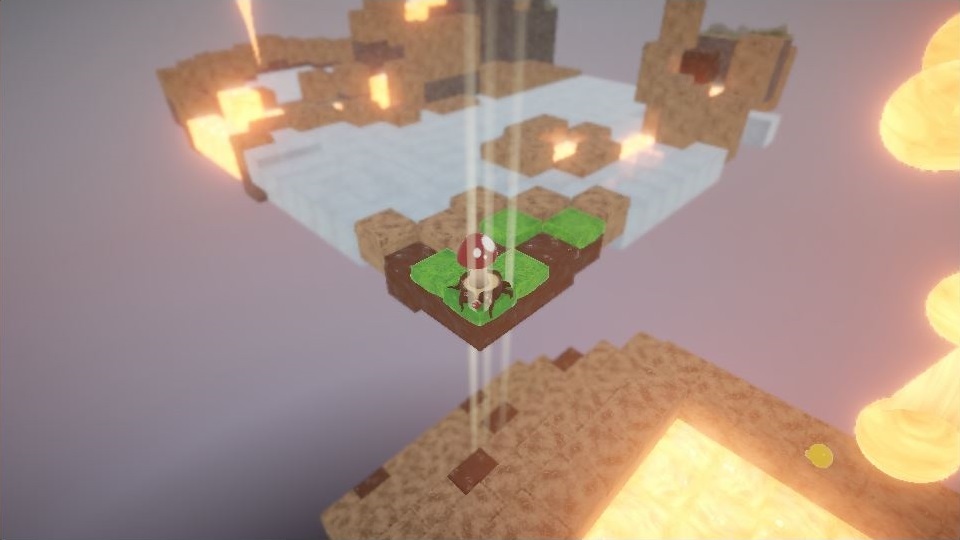
Make sure all that lava doesn't melt your PC.
The final insult in this chain of events came from itch.io, the website that hosted the jam. I made an account in order to edit the game page, and my profile was promptly flagged as spam (I suspect due to my Linux useragent and linking to my own website). A week later, I emailed support asking to be un-flagged, and only received a response a week after that when one of my teammates contacted support on my behalf. Itch has a cutesy and pretentious atmosphere I dislike anyway, so if I publish a solo creation in the future, I'll use a different site.
Conclusion
I admit to being the weak link in the chain. My only Unity experience going in was one previous game jam and a few hours of very basic YouTube tutorials, and my insistence on using Linux (everyone else was on Windows) led to time-consuming struggles with OS-specific Unity bugs. I'm very grateful to the rest of the team for putting up with me. Despite all of the issues, I am generally happy with how Spore Story turned out. The two things I enjoy about being a developer are the opportunity to learn and the ability to make the kinds of things I want to see. Journey (2012) wasn't a conscious influence on Spore Story, but I really enjoyed how floating in the air worked in that game, and this provided a similar experience.
If I were to do this whole thing over, I would:
- If using a game engine, pick a version before the jam, verify that it's free of relevant bugs, and stick with it no matter what. If, in the middle of the jam, it turns out not to support a feature you want, too bad.
- Set hard deadlines for critical mechanics like player launch height, falling speed, and so on. Level design depends on these being set in stone.
- Set hard limits on number of polygons and map sizes, and verify that performance is acceptable. Avoid particle effects and variable audio sources.
- Communicate better to avoid duplicating effort and stepping on each others' toes.